Showing posts with label Random Number. Show all posts

Friday, August 7, 2015

Add dummy data to a cube or muddle data to make it unintelligible

In continuation from my last post  – Creating a large dimension, this post will describe how we obfuscated data in an existing cube.  The premises on which these 2 processes were built, was to mimic the most voluminous cube for support; then reproduce the myriad of issues that accompanied this cube (be it in TM1, Cognos BI or Cognos Insight).

Goal is to obfuscate the numbers, and modeled on Dilbert’s logic :)


To illustrate, I have built a sample cube with few dimensions.  Time dimension has months from Jan 2014 through Dec 2014.  There is Chart of Accounts as well as dimension with Regions (picked from Planning Sample database).  Also there is a dimension called “aLargeDim” – this is the one with close to half a million elements in it.  For the purpose of demonstration I have created it with 1,000 elements in it.

Turbo Integrator (TI) process we have consists of code in Prolog, Data and Epilog tabs.  The original process I had, is slightly modified to add dummy data to the cube.  Since I cannot attach files in WordPress, I will explain it with snippets of code.  Please note that I have only shown snippets of code.  It will serve you as a template to build on it.

Parameters


You’d need to specify the cube name and option 1 (to add dummy data) or 2 (muddle data to make it unintelligible).  The last 2 parameters are required, if you are adding new data.  It controls the volume of data being added (defined in percent) and on what dimension you’d like to control.

Prolog

Some housekeeping steps like disabling the logging on cube is not shown.  Bulk of the code in Prolog is made up of the while loop.
  • If we are adding data, then we are calculating the number of intersections in the cube (highlighted in maroon color)
  • If we are adding data, then pick only percentage of members from the dimension mentioned in the parameter name (highlighted in green color). Say there are 1,000 elements in it and pi_PercentPopulate is 20, then the code will pick every 5th element (100/20 = 5) … there by totaling the number of that dimension elements to 200 (20% of 1000 = 200)
  • If we are adding new data, then we need to pick cells in a view that are zero (skip zeroes set = 0)
  • If we are making existing data unintelligible, then we need to pick only the non-zero value (skip zeroes set = 1)
vi_CellCount = 1;
vi_AddCount = 0;

i = 1;
vs_DimName = TabDim (vs_CubeName, i);
WHILE (vs_DimName @<> ”);
    # Calculate the total cell count.  This is required when we need to populate a % of cells
    vi_DimSiz = DimSiz (vs_DimName);
    vi_ElemCnt = 0;
    IF (pi_AddData = 1);
        WHILE (vi_DimSiz > 0);
            IF (ElLev (vs_DimName, DimNm (vs_DimName, vi_DimSiz)) = 0 );
                vi_ElemCnt = vi_ElemCnt + 1;
            ENDIF;
            vi_DimSiz = vi_DimSiz – 1;
        END;
        vi_CellCount = vi_CellCount * vi_ElemCnt;
    ENDIF;
IF (SubsetExists (vs_DimName, vs_SubName) <> 0 );
SubsetDeleteAllElements (vs_DimName, vs_SubName);
ELSE;
SubsetCreate (vs_DimName, vs_SubName);
ENDIF;
    IF (Upper (ps_DimName) @= Upper (vs_DimName) & pi_AddData = 1);
        # If the dimension name matches to the prompt value, then pick only % of its elements
        # Ex: if pi_PerCentPopulate = 20, then pick 20% of elements from this dimension
        vi_DimSiz = DimSiz (vs_DimName);
        vi_ModCount = Round (100 \ pi_PercentPopulate);
        vi_SubInsPt = 1;
        WHILE (vi_DimSiz > 0);
            IF (ElLev (vs_DimName, DimNm (vs_DimName, vi_DimSiz)) = 0 & Mod (vi_DimSiz, vi_ModCount) = 0);
                SubsetElementInsert (vs_DimName, vs_SubName, DimNm (vs_DimName, vi_DimSiz), vi_SubInsPt);
                vi_SubInsPt = vi_SubInsPt + 1;
            ENDIF;
            vi_DimSiz = vi_DimSiz – 1;
        END;
    ELSE;
        # Otherise use all the elements in the dimension
        SubsetIsAllSet (vs_DimName, vs_SubName, 1);
    ENDIF;
    ViewSubsetAssign(vs_CubeName, vs_ViewName, vs_DimName, vs_SubName);
    i = i + 1;
    vs_DimName = TabDim (vs_CubeName, i);
END;
vi_NumOfDims = i – 1;
# If we are adding data and ps_DimName is not a valid one, then quit
# Otherwise we will end up processing 100% of intersections
IF (pi_AddData = 1 & vi_SubInsPt <= 1);
ProcessQuit;
ENDIF;
IF (pi_AddData = 1);
    # If we are adding data, then we need to conisder the blank cells
    ViewExtractSkipZeroesSet     (vs_CubeName, vs_ViewName, 0);
ELSEIF (pi_AddData = 2);
    # If we are modifying data, then we ned to modify only the non-zero cells
    ViewExtractSkipZeroesSet     (vs_CubeName, vs_ViewName, 1);
ENDIF;

Data Tab

In the data tab, we call a random value and then multiply it with the existing data (if required).  The underlined piece feel free to change it whatever you want.

vi_RandVal = Rand ();
IF (pi_AddData = 1);
# Skip every so often
vi_Populate = IF (vi_RandVal < 0.33333, 0, 1);
IF (vi_Populate = 0 );
ItemSkip;
ENDIF;

IF (vi_AddCount > (pi_PercentPopulate * vi_CellCount \ 100));
ProcessBreak;
ENDIF;
ENDIF;

vi_Sec = StringToNumber (TimSt (Now (), ‘\s’) );
vi_NewVal = (NValue + (100 * vi_Sec) ) * 0.75 * vi_RandVal ;
vi_AddCount = vi_AddCount + 1;

IF (vi_NumOfDims = 2);
CellIncrementN (vi_NewVal, ps_CubeName, Dim_001, Dim_002);
ELSEIF (vi_NumOfDims = 3);
CellIncrementN (vi_NewVal, ps_CubeName, Dim_001, Dim_002, Dim_003);
ELSEIF (vi_NumOfDims = 4);
CellIncrementN (vi_NewVal, ps_CubeName, Dim_001, Dim_002, Dim_003, Dim_004);
ELSEIF (vi_NumOfDims = 5);
CellIncrementN (vi_NewVal, ps_CubeName, Dim_001, Dim_002, Dim_003, Dim_004, Dim_005);
… R E P E A T    T H E   B L O C K     F O R    A S    M A N Y     D I M E N S I O N S    Y O U    H A V E

Epilog tab has not much code in it, except to turn the logging on the cube, back to initial value.

Demonstration


Ok, not literally … but for those, who insist on seeing accurate numbers (to the decimal) it may lead to confusion :)

I have entered some predefined values in ‘Sales’ account for Jan 2014. This is what the data looks like. Nice, round numbers are present. We will run the code with option 2 for pi_AddData parameter.
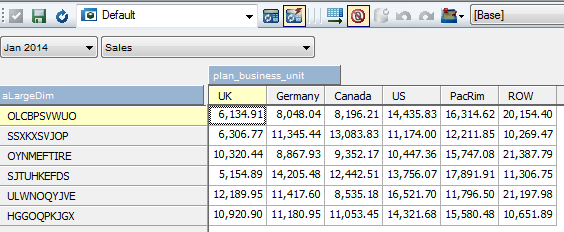

 
This is the output after running the process.  Process runs fairly fast, as we have to work with <100 rows.  As you can see the numbers are distorted.


Let’s clear the data in the cube and re-run the process with pi_AddData = 1 and populate about 5% of cells.  The output will look something like this – shown for couple of accounts for Jan 2014.  Data however is spread across all the months and accounts.


References:

Happy Data Manipulation to you!

Monday, July 27, 2015

Create a very large dimension in Cognos TM1 using Turbo Integrator (TI)

There are instances during an implementation where in, there is a need to export out one or more cubes for Support.  However, client has reservation against data being taken out from their premises despite:
  • Having signed an NDA (Non Disclosure Agreement)
  • Erasing out original data and loading arbitrary data
Recently we ran into such situation.  Over the course of this and the next post, I will cover steps that we took to simulate the cube for Support.


The cube that we wanted to replicate had bunch of dimensions, that we could easily mimic – like Time, Chart of Accounts, Region, Type, Indicators etc.  However, for a one particular dimension it was a daunting task to mimic (at least manually).  It has about 500,000 elements in it.  The number of elements in it, continues to grow month-on-month basis, with a potential of adding roughly couple of thousand elements each month.

Besides being THE largest dimension in our model, entire implementation revolved around it.  Hence it was critical to have it mimicked and also load arbitrary data in couple of cubes using this dimension.

The TI process code is pasted below.  It accepts few parameters, the description is mentioned as well.  We’d need to enter the dimension size (number of leaf level elements), length of each element, whether they are numeric/text/alphanumeric and lastly the dimension name.


 This code relies heavily on the random number generation to determine the numbers/characters that go into the element.  So it natural to encounter is the repetition of random numbers in TM1 after 65,536 times.  Check out my previous post on this!

Here we are attempting to create half a million random elements which are made up of only text characters.  As you increase the number to a million or two, there is possibility of elements that are formed are repeated (since random numbers in TM1 start repeating).  In such instances, attempts to create elements upto the parameter specified may run into an infinite loop.  To avoid the possibility running the code forever, I am breaking the execution, if the attempt to create an element goes above 10K the dimension size. 

Turbo Integrator (TI) Code consists of only the prolog tab and here is the actual code:

vi_Siz = IF (pi_Siz = 0, 10000, pi_Siz);
vi_Len = IF (pi_Len = 0, 10, pi_Len);
vs_DimName = ps_Name;
vi_Attempt = 0;
vi_MaxHit  = 0;
vi_MulFac  = 1;
IF (DimensionExists (vs_DimName) > 0);
    # Either destroy the dimension or stop execution, based on your preference
    DimensionDeleteAllElements (vs_DimName);
ELSE;
    DimensionCreate (vs_DimName);
ENDIF;
WHILE (vi_Siz > 0);
    vs_Elem = ”;
    vi_Ctr = 1;
    WHILE (vi_Ctr <= vi_Len);
        # TM1 starts repeating random numbers after 65,536 times.  Hence use a multiplication factor to change the random value
        IF (vi_MaxHit = 64500);
            # This is where you can play around and alter way random numbers are generated
            vi_MulFac = vi_MulFac + Rand() * 2 + Rand ();
            vi_MaxHit = 0;
        ENDIF;
        vi_RandVal = Rand() * vi_MulFac;
        # If dimension elems are only numeric or alpha numeric with 50% of probablity, enter this block
        IF (pi_AlphaNumeric = 1 % (pi_AlphaNumeric = 3 & vi_RandVal < 0.5));
            vi_RandMod = Round (Mod (vi_RandVal * 10, (vi_Len -1)));
            vs_NewLetter = NumberToString (vi_RandMod);
        # If dimension elems are only string or alpha numeric with the other 50% of probablity, enter this block
        ELSEIF (pi_AlphaNumeric = 2 % (pi_AlphaNumeric = 3 & Rand() >= 0.5));
            vi_RandMod = Round (Mod (vi_RandVal * 100, 25));
            vs_NewLetter = Char (65 + vi_RandMod);
        ENDIF;
        vi_Ctr = vi_Ctr + 1;
        vs_Elem = IF (vi_RandVal < 0.5, vs_Elem | vs_NewLetter, vs_NewLetter | vs_Elem);
        vi_MaxHit  = vi_MaxHit + 1;
    END;
    IF (DimIx (vs_DimName, vs_Elem) = 0);
        DimensionElementInsert (vs_DimName, ”, vs_Elem, ‘N’);
        vi_Siz = vi_Siz – 1;
    ENDIF;
    vi_Attempt = vi_Attempt + 1;

    # Stop the loop, if the number of times you have attempted to create elements is about 10,000 higher than the element count
    # You can increase/decrease the number to your preference
    IF (vi_Attempt > pi_Siz + 10000);
        vi_temp = vi_siz;
        vi_Siz = 0;
    ENDIF;
END;

AsciiOutput (GetProcessErrorFileDirectory | ‘sk.txt’, ‘Number of time executed ‘ | NumberToString (vi_Attempt) | ‘, ‘ | NumberToString (vi_temp));

The code an be modified to make the elements begin with a certain character(s) like ‘SKU_’, ‘CC’ etc.  This is what the properties window shows after the code is run and some sample elements.


Monday, July 6, 2015

Cognos TM1 Rand() function - it is NOT quite random after all !

Let me start the post with a Dilbert cartoon on Random number generator :)


Ok, so we have Rand() function in Cognos TM1 to generate random numbers,
  1. Which can be used in Rules as well as in Turbo Integrator (TI)
  2. Which is uniformly distributed between 0 and 1
  3. That generates a decimal with 9 digit precision (theoretically up to a billion combination of numbers)
  4. Whose seed is generated at the start of TM1 server
While I was analyzing the random number distribution, I noticed certain odd behavior.  Upon narrowing down the possible culprit, what I found out is that, IBM Cognos TM1 Rand () function can generate up to 65,536 unique numbers.  Thereafter it starts repeating the numbers.  To test this behavior, enter below piece of code in the prolog of a TI process and execute it.
i = 1; iMax = 65536; WHILE ( i <= iMax *2 );
    IF (i <= iMax);
        vFile = 'sk1.txt';
    ELSE;
        vFile = 'sk2.txt';
    ENDIF;
    vFile = GetProcessErrorFileDirectory | vFile ;
    AsciiOutput (vFile, NumberToString (Rand()) );
    i = i + 1;
END;
It will generate 2 files where in
  • sk1.txt captures 1st to 65,536 Rand() calls
  • sk2.txt captures 65,537 onwards all the way to 131,072 Rand() calls
A screen grab showing the first several lines of these 2 files is below:
Once a TM1 server is ready then you can get up to 65,536 unique random numbers.  After that it is no longer random, it is predictable (with 100% accuracy). Besides, this number is on the server basis (not user basis)
Now let's modify the code slightly to prove the point.
vFile = 'sk3.txt';
vFile = GetProcessErrorFileDirectory | vFile ;
AsciiOutput (vFile, 'Code run by: ' | TM1User () );

i = 1;
iMax = 65536;
WHILE ( i <= iMax);
AsciiOutput (vFile, NumberToString (Rand()) );
i = i + 1;
END;
Run this process.  It will now create sk3.txt.  Log out from architect and log back in with a different user.  Modify the file name to sk4.txt, save and run the process
vFile = 'sk4.txt';
Let's compare sk3.txt with sk4.txt
 The random numbers generated between the 2 users are exactly the same i.e., the unique times IBM Cognos TM1 can generate random numbers is 65,536 and it is system wide (irrespective of users).  If the TM1 service associated with the server is restarted, then the slate is wiped clean.